Skip to content
NewWon quotes post to QuickBooks Onlineon the Shop plan

From drawing to quote.

One request, BR-4471, followed from the customer’s email to a quote the buyer accepts online.

It lands in your queue.

Forward the customer’s email to your shop’s intake address, or drop in the drawings, any 3D model and the email text. BR-4471 arrives with its drawing and the quantities to quote, and waits in the queue with everything else still open.

Part
BR-4471 Rev C
Quantities
25 / 50 / 100
Customer
Lakeside Hydraulics
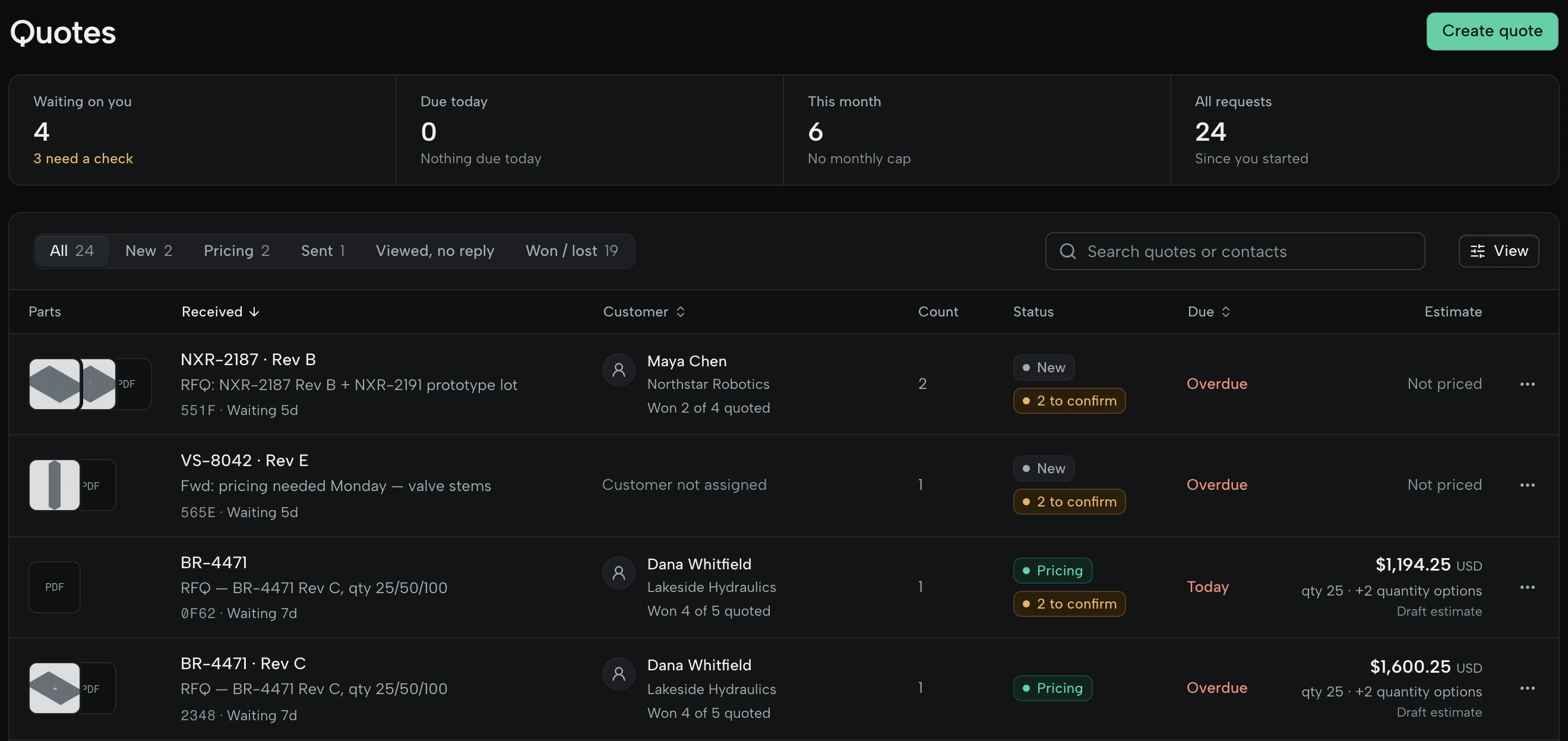
The Quotes queue: 4 waiting, 3 needing a check; requests NXR-2187, VS-8042 and BR-4471 with their part previews, customers, status (New, Pricing, 2 to confirm) and estimates such as $1,194.25 and $1,600.25.

The part, in 3D beside the drawing.

STEP, IGES, STL and 3MF files open in the viewer, up to 1,000 MB each. On STEP and IGES, holes, pockets and setups are measured from the model, and a section cut shows what the drawing doesn’t.

File
BR-4471_RevC.step

Every value traced to the drawing.

Material, revision, quantities, tolerances and finish are read from the files, each with the page and the exact words it came from. A value it can’t point to, or one two files disagree on, becomes a check, and the quote can’t be sent until every check is settled.

Drawing says
6061-T6
Read as
6061, temper missing
After your check
6061-T6 confirmed
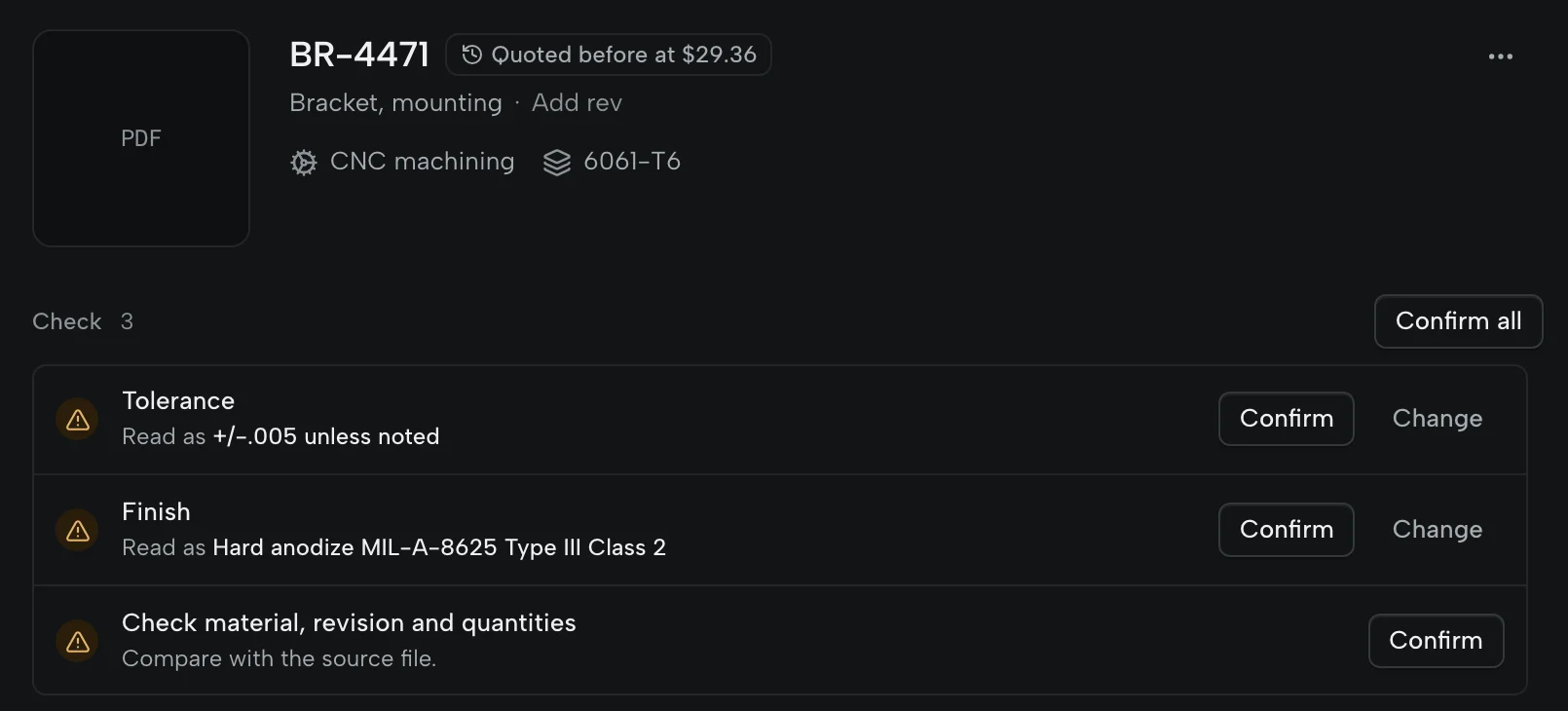
BR-4471, bracket, mounting, CNC machining in 6061-T6, quoted before at $29.36, with three checks to confirm: tolerance read as +/-.005 unless noted, finish read as hard anodize MIL-A-8625 Type III Class 2, and material, revision and quantities.

Priced from your rates and your history.

Type the price, or build it from material, setup and run time at your own machine and labour rates. Setup is spread across each quantity break; outside services and first-article charges go on their own lines. If you quoted the part before, last time’s price is beside it.

With a model attached, a starting price from your rates can fill in, marked as an estimate. By default it waits until it has landed within 30% of five quotes you actually sent.

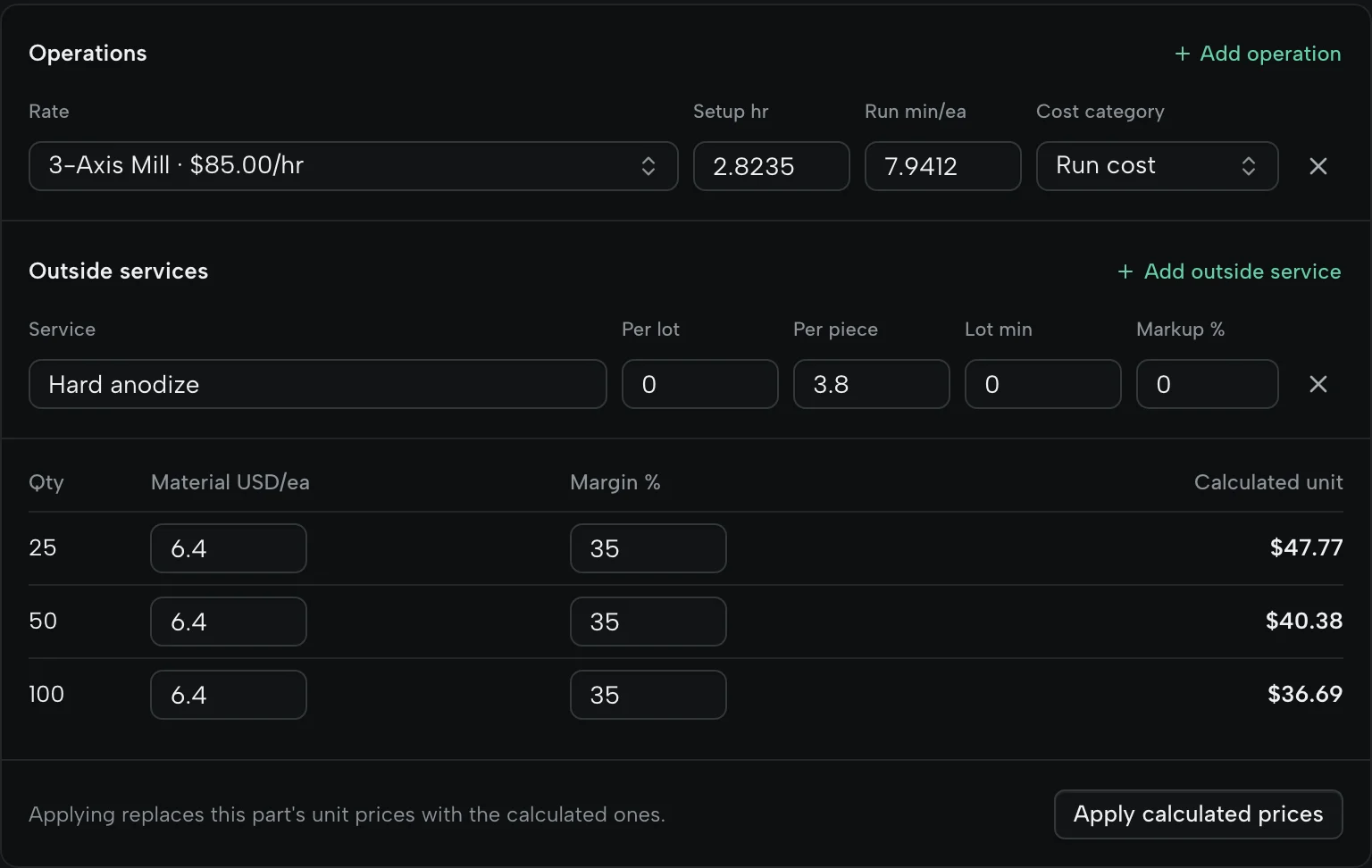
The cost breakdown for BR-4471: the 3-Axis Mill at $85.00 an hour with setup and run time, hard anodize as an outside service at $3.80 a piece, and material and margin for 25, 50 and 100 pieces, calculated to $47.77, $40.38 and $36.69, with Apply calculated prices.

Sent when you approve it.

Review the prices, quantities, lead time and terms, then send it. On Shop it goes from your own Gmail or Outlook and lands in your Sent folder; on Free it goes as your shop via QuoteSooner, with replies to you. The buyer accepts on a web page with a PO number, or declines, and the answer comes back to the quote.

Revise it as a new revision, mark it won or lost with a reason, and turn a won quote into an order. Open the buyer’s copy

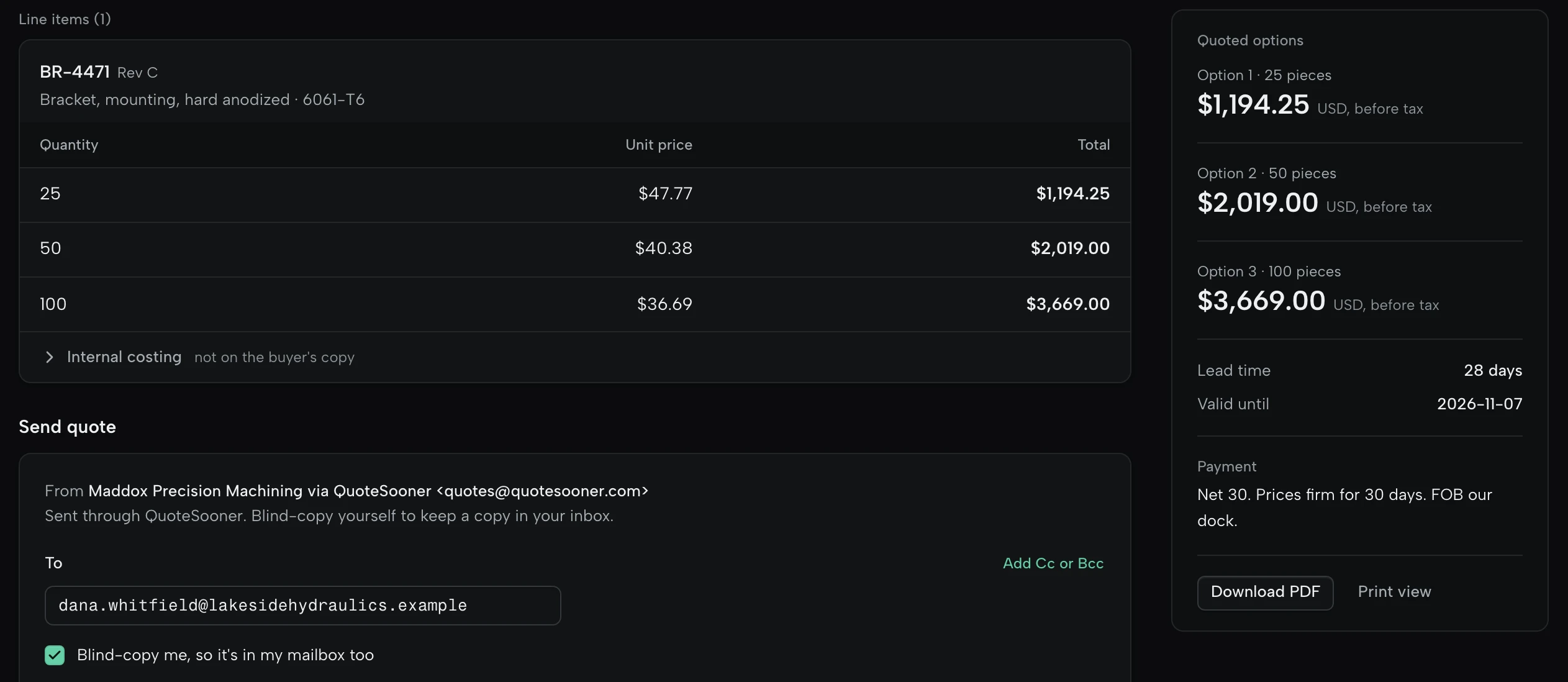
Quote Q-2026-0001 for Lakeside Hydraulics: BR-4471 Rev C in 6061-T6 at $47.77, $40.38 and $36.69 for 25, 50 and 100 pieces, totals of $1,194.25, $2,019.00 and $3,669.00, a 28-day lead time, valid until 2026-11-07, net 30.

Common questions.

Requests, models, prices. How we handle drawings

Do customers need to change how they send RFQs?

No. They keep emailing you as usual. Forward the email or drop their files into QuoteSooner, and the quote goes back with the PDF attached and a link to accept it online: from your own Gmail or Outlook on Shop, or as your shop via QuoteSooner on Free, with replies to you either way.

Do I need a CAD model to start?

No. PDF drawings and the customer’s requirements are enough. When a model comes with the RFQ, STEP, IGES, STL and 3MF files open in 3D, up to 1,000 MB each. Other CAD files are kept with the request.

Can I use my own prices?

Yes. Type unit prices directly, or build them from material, setup and run time at your own rates. Setup is spread across each quantity break, and one-time charges such as tooling or first-article inspection sit on their own lines.

What does the software decide?

It reads part details from the drawings and request text and shows the page and words each one came from. You confirm or correct them. Your rates set the price and you approve the quote. It can make mistakes, which is why every value points back to its source.

How do we get started?

Start free with Google, Microsoft or an email link and upload a request you have already quoted, so you can compare. Free covers 5 production RFQs a month with no card. Want help setting up? We’ll load your rates and work through one RFQ with you.

Quote the next RFQ in your inbox.

Start on the sample request. No card, no customer drawings needed.