
QuoteSooner vs. a spreadsheet for CNC quoting
Short answer
If one person quotes a few simple jobs a week, a well-built spreadsheet works and costs nothing extra. QuoteSooner is for when requests start piling up: it reads the drawing and the customer’s request into a draft, flags what is missing or conflicting, keeps every quantity break and past price with the part, and produces the quote PDF.
What a spreadsheet does well
Most small CNC shops quote in Excel, and for good reason. A spreadsheet is free, it is already open, and it does exactly what its owner built it to do. The shop rate, the material markup and the setup formula are all yours, and nobody has to learn anything new.
If one experienced person quotes, the parts are simple, and a few requests come in each week, a spreadsheet is a perfectly good tool. Switching only makes sense when the spreadsheet starts costing you time or jobs.
Where spreadsheets start to cost you
The formula is rarely the problem. The work around it is:
- Re-typing the drawing. Part number, revision, material, tolerances, finish and quantities are copied by hand from a PDF and an email into cells. A missed Rev C or a misread finish becomes a wrong price.
- Nothing records what was checked. The sheet holds the answer, not the questions. Whether someone confirmed the material, or noticed the email asked for a different revision than the drawing, lives in someone’s head.
- Last time’s price is hard to find. When a part comes back, finding what you charged means searching folders named BR-4471_quote_v3_FINAL.xlsx and old emails.
- The quote is a second document. The numbers are in Excel and the customer’s quote is in Word or a PDF template, so every change is made twice.
- Requests wait. When the person who knows the spreadsheet is on the floor, the inbox waits too, and the buyer has often sent the same request to other shops.
Side by side
| Spreadsheet | QuoteSooner | |
|---|---|---|
| Starting point | A blank sheet or a copied old quote | The customer’s drawings and request, uploaded |
| Part details | Typed by hand from the PDF and email | Read from the drawing and request; you confirm each one |
| Missing or conflicting details | Whatever the estimator notices | Flagged as checks to confirm or correct before pricing |
| Your rates and formulas | Fully yours, in your own formulas | Your shop rates; enter a unit price directly or build it from material and operations |
| Quantity breaks | Extra columns, copied per job | Each quantity priced side by side on the part |
| Past prices | Search old files and emails | Shown on the part when you quoted it before |
| The quote the buyer gets | A separate Word or PDF template | A branded quote PDF made from the same numbers |
| Cost | Free with Office | US$499 a month per shop, everything included |
What changes with QuoteSooner
You upload the customer’s drawings and paste their request. QuoteSooner reads the part details, and anything it is unsure of, or anything the drawing and the email disagree on, becomes a check you confirm or correct. It never fills a gap with a guess.
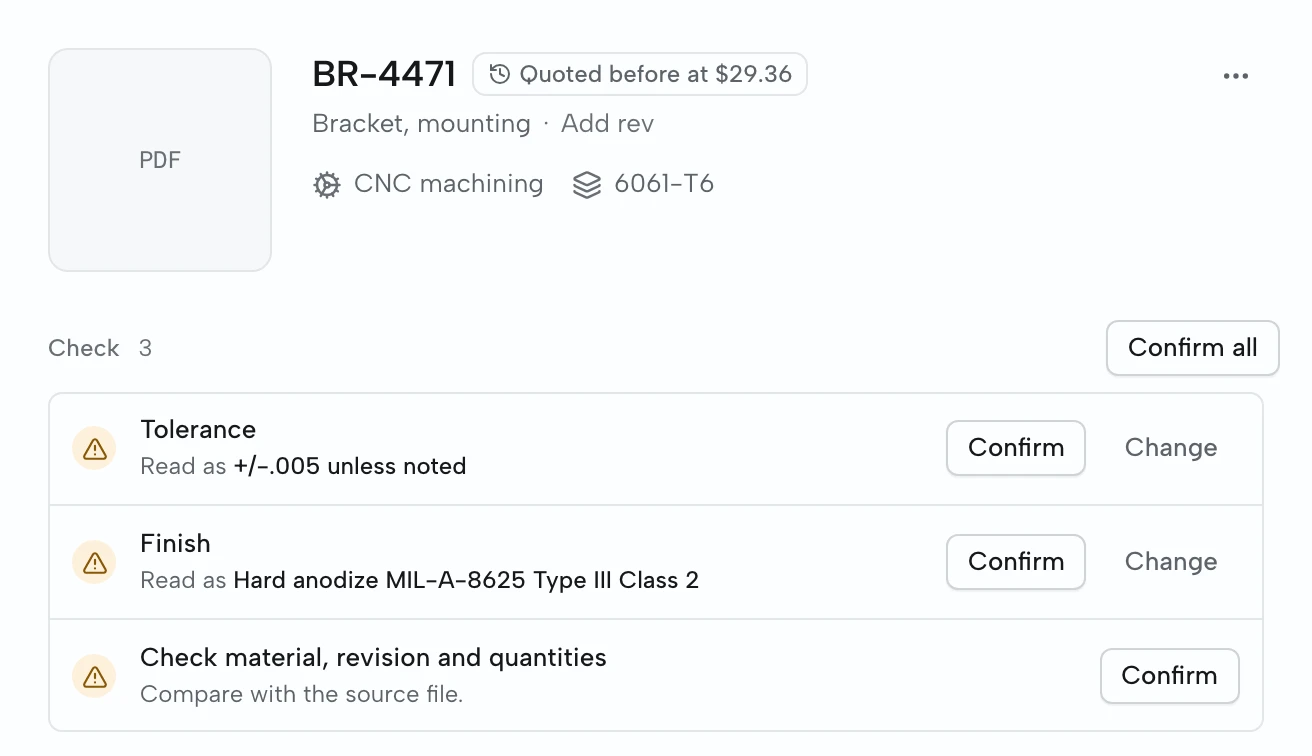
Then you price it the way you already do. Type the unit price for each quantity, or build it from material, setup and run time at your own rates. If you quoted the same part before, that price is shown beside it. When you approve the price, QuoteSooner makes the quote PDF from the same numbers.
When to stay with a spreadsheet
- You quote fewer than a handful of requests a week and they are simple.
- One person quotes everything and never needs to hand a quote to someone else.
- Your requests rarely include drawings, so there is little to read or check.
- The monthly price would cost more than the time it saves you.
If that describes your shop, keep the spreadsheet. If requests are waiting on one person, or a misread drawing has cost you money, a walkthrough with one of your own requests will show quickly whether QuoteSooner is worth it.
Questions
- Can I keep my own pricing formulas?
- Your rates, yes. In QuoteSooner you can type the unit price for each quantity directly, so a shop that prices in its head or in its own spreadsheet can keep doing that while the drawing, checks and quote stay together. You can also build a price from material and operations at your own rates.
- Do I need a CAD model?
- No. You can quote from PDF drawings and the customer’s requirements. CAD processing is being prepared for guided pilots; a CAD model is not needed to use the drawing and pricing workflow.
- Does QuoteSooner guess prices for me?
- No. It reads the part details for you to confirm and can show what you charged for the same part before, but the price on the quote is always one you entered or approved.
- What does it cost compared to Excel?
- QuoteSooner is US$499 a month per shop with no seat or quote limits; the first ten paying shops keep US$399 a month for life. Excel costs nothing extra if you already have Office, so the comparison is the time spent re-typing, checking and searching, and the jobs lost to slow quotes.